


Numecent’s Cloud-Native Application Container Management Platform for Windows Desktops
Cloudpager is the first and only application container management platform for Windows desktops. Built on Cloudpaging Content Delivery Network (CCDN), a global cloud backbone running on Amazon Web Services, which has been in production more than a decade, making it one of the oldest and most battle-tested cloud-native delivery solutions in market.
Over the past decade it has enabled enterprises like PTC to extend DevOps capabilities to the management of Windows desktop applications across modern desktop and multi-cloud environments. We’re not just talking about small open-source applications either. Enterprises like PTC have leveraged our cloud solutions to dynamically provision large applications like Creo to users around the world orders of magnitudes faster than traditional downloads.
This blog provides an overview the Cloudpager administrative console, including what each tab enables administrators to do.
Cloudpager Components
Cloudpager enables administrators to dynamically provision, update, rollback, and recall applications across modern physical and virtual desktop environments. The “secret sauce” here is our Cloudpaging containers, which ensure even your most complex legacy applications can run on the latest Windows OS without sacrificing functionality, performance, or compatibility.
Dashboard
The Cloudpager Dashboard provides administrators with a single pane of glass to review application and desktop session information.
With comprehensive insights, including total number of desktop sessions and users, application status, application deployment and usage data, and more, administrators can quickly evaluate the level of activity in the environment and track usage growth and other trends.
Applications
Applications is a centralized repository of all application containers in your estate. Cloudpager provides support for our own Cloudpaging format, as well as Microsoft App-V, MSIX, and Amazon WorkSpaces Application Manager (Amazon WAM) packages.
Getting your application containers onto Cloudpager is as simple as a drag and drop from your desktop to the administrative console.
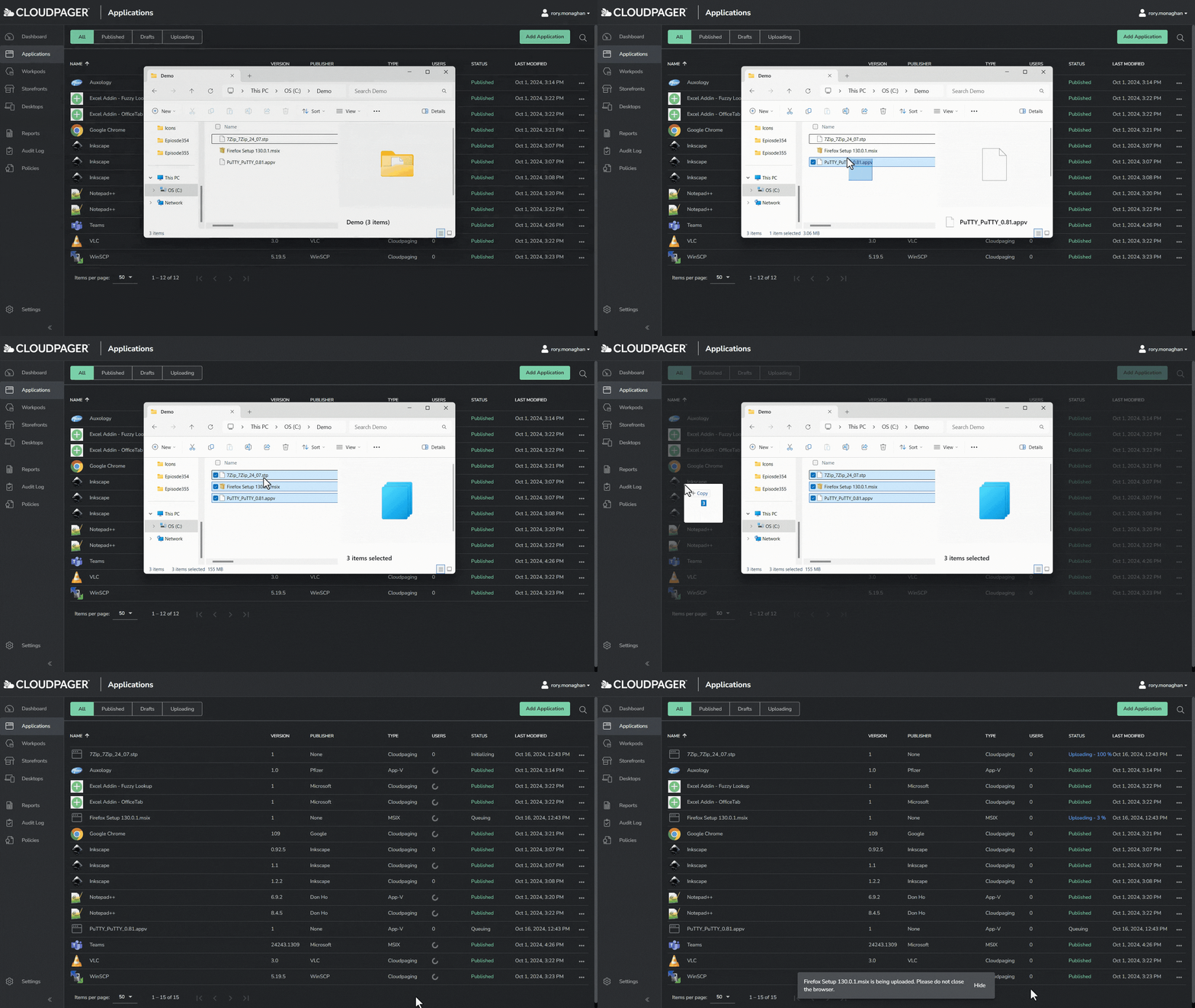
For existing App-V users, this tab automatically optimizes existing App-V packages to run beyond end of life (Microsoft has announced this will be April 14, 2026).
Workpods
Workpods is a feature that enables you to group sets of applications together for auto-deployment to entitled groups and users, regardless of the physical or virtual Windows desktop they are using. People can belong to multiple Workpods, enabling administrators to auto-deploy applications to users across their enterprise.
Customers leverage this to group applications based on user need. For example, they will create a Workpod for All Employees that includes applications everyone in the organization will leverage (e.g., Google Chrome, Notepad++). They will then create a Design Engineers Workpod to auto-deploy Architects and Industrial Engineers with engineering applications like AutoCAD, Revit, and Civil3D.

Case Study: Waterman Group
How Waterman Group Runs Resource-Intensive Engineering Applications Like Revit, Civil 3D, and AutoCAD on Azure Virtual Desktop in a Secure and Compliant Manner.
Read the Case StudyStorefronts
Cloudpager Storefronts enable administrators to provide employees with self-service application access via an online web portal. Just like Workpods, people can belong to multiple Storefronts. Cloudpager will present applications from every Storefront employees are assigned in a single pane of glass.

Our customers like to utilize this feature for applications that are used less frequently, or for people that require different application versions for different projects. For example, if a Civil Engineer has projects that require different versions of Revit, they can present different application versions within a Storefront and enable them to select the version they need for a given project. Customers of ours like to use this on traditional physical endpoints. By providing a curated list of available applications, their people can easily add the apps to their desktops on their own.
Desktops
Desktops presents a list of desktops that have been used for accessing and executing application containers. Administrators can sanitize this data and even add helpful attributes such as what type of desktop each user is running (e.g. desktops, laptops, VDI, etc.). Administrators can also provide remote support through Desktops, including gathering and viewing client logs, sorting of the status of all containers available in the desktop sessions, forcing application container sessions to stop/close, removing an application container from an active user session, and more.

Reports
A customer-favorite feature of Cloudpager is the ability to track all application container activity directly within the platform. Many leverage the data within this tab to discern what applications are actually being used by employees, as well as the Windows OS they are being used on. This is particularly valuable when evaluating how many licenses of a given application are needed upon renewal with third-party software vendors.

All data in the Reports tab can also be exported and ingested into third-party solutions to support
Audit Log
Cloudpager tracks all administrative actions taken on the platform. On top of that, all changes made (e.g., adding applications to a Workpod or Storefront) prompt administrators to add comments to annotate the action taken. These prompts are used by many of our customers to align with their change control processes.
The Audit Log tab provides a single pane of glass to review all changes to validate the integrity of your existing processes and systems.
If you want to view this data outside the Cloudpager administrative console, all data can be exported as a CSV and ingested into third-party analytics tools (e.g., Power BI) to include in existing dashboards and security workflows.
Policies
The Policies feature in Cloudpager offers a truly unique means of controlling applications. Organizations can set policies to enforce license control, limiting applications at the container level to only run on a certain number of desktops per user, restricting the number of concurrent sessions, and more. Policies can also be used to allow users to run select applications offline, which could be ideal for roaming employees who use laptops. Policies can also be used to automatically revoke application access on a set interval.

All these capabilities can be used to partially automate application lifecycle management and streamline future desktop migrations by eliminating part of the estate rationalization process.
Conclusion
Cloudpager is the key to modernizing application management across physical and virtual Windows desktops. It goes far beyond simply centralizing the management of your application estate. Establishing cloud-native application container management capabilities makes it easy for administrators of any tenure to manage applications at global scale in a secure, compliant, and highly automated fashion.
Speak to an Expert
For a live demonstration on how Numecent technologies simplify the mobilization and management of applications across modern Windows desktop and multi-cloud environments, request a session with our Solutions Architects in the form below:


