
Microsoft AppAttach in Azure Virtual Desktop
Ensure even your most complex legacy and custom applications can seamlessly run on Azure Virtual Desktop without sacrificing functionality or performance with Cloudpager’s integration to App attach.
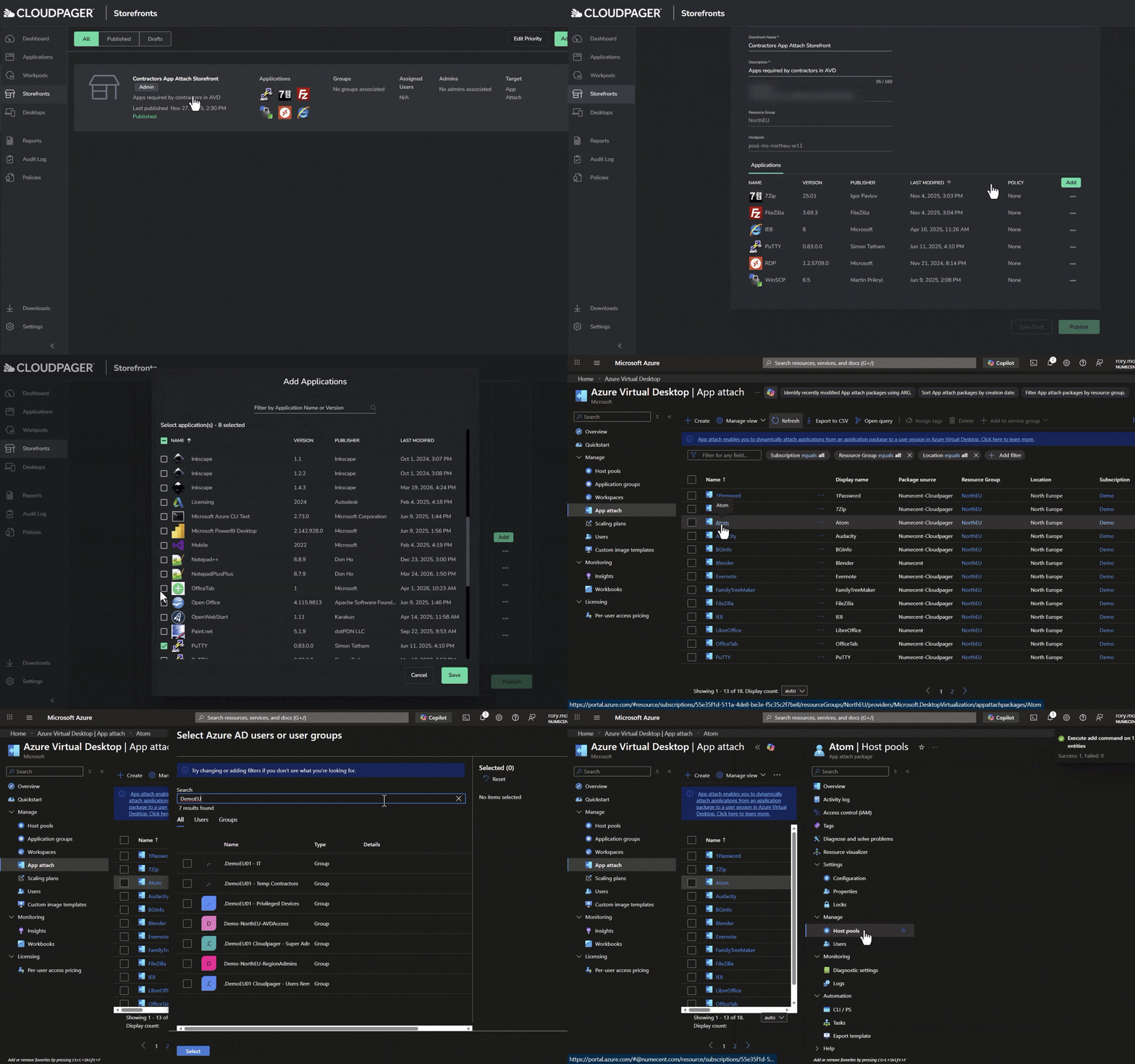
Key Capabilities
Provide the Best Azure Virtual Desktop Application Experience
Cloudpaging containers ensure even your most complex legacy applications can run on Microsoft Azure Virtual Desktop in a secure, compliant, and cost-efficient manner. With Cloudpager’s integration to App Attach, it’s easier than ever to deploy your applications across persistent and non-persistent desktops without sacrificing functionality or performance.
Eliminate Legacy Application Deployment Issues
With granular controls over what application components to isolate to or integrate from the desktop and other applications, Cloudpaging® containers eliminate compatibility issues across modern Windows operating systems.
For example, you may have a legacy application that requires older versions of Java Runtime Environment (JRE). Cloudpaging enables you to isolate that specific dependency while maintaining full functionality, interoperability, and performance. Once packaged into Cloudpaging containers, these applications can be seamlessly deployed to Azure Virtual Desktop via App Attach.

Instantly Modernize Application Management in the Cloud
Numecent’s Cloudpager® platform extends DevOps capabilities to the management of Windows desktop applications. From a single pane of glass, administrators can dynamically provision Cloudpaging and MSIX applications and updates to end user desktops, including those in active sessions.
Containerizing applications with Cloudpaging and deploying via App Attach accelerates deployment speeds, streamlines IT operations, enhances operational efficiency, and reduces desktop image management overhead.

Streamline Cloud and Azure Virtual Desktop Adoption
Cloudpager’s integration to App Attach is the fastest route for existing on-premises Cloudpaging customers to go to the cloud and Azure Virtual Desktop. All you have to do is drag and drop Cloudpaging containers to Cloudpager, enable App Attach, and they will be immediately available within App Attach to provision to Azure Virtual Desktop.

eBook
Reduce Azure Virtual Desktop Custom Images and Host Pools to Cut Costs up to 50%
Discover how you can cut Azure Virtual Desktop run costs in half by containerizing your applications and dynamically managing them from the cloud with Cloudpager. This guide highlights how to abstract applications out of your images and seamlessly run them across persistent and non-persistent multi-session desktops so you can drastically reduce the number of Custom Images and Host Pools required to run AVD

Solutions
Key Use Cases
Our approach to application virtualization fundamentally differs from traditional application virtualization and layering solutions. Applications are broken down into instruction fragments (“pages”) and dynamically provisioned directly to end users as needed.
Maximize Application Compatibility
Cloudpaging gives administrators control over which application components to isolate from or integrate with the system (e.g., a single DLL file). With support for drivers, COM+ services, printers, and more, virtually any application can be packaged and deployed across modern Windows OS.
Accelerate Application Launches
Only five to ten percent of Cloudpaged applications are required to launch, accelerating launch times more than 20x compared to traditional installation methodologies.
Enhance Application Security
Containerizing applications with Cloudpaging secures them throughout their lifecycle with application isolation capabilities, end-to-end encryption, user Cloudpaging Player caches uniquely encrypted per user, and dynamic provisioning and removal of applications.
Increase Visibility and Control
Cloudpaging meters all application usage. Combined with our Cloudpager platform’s real-time dashboards, audit logs, reporting, and automated DRM controls, administrator’s gain unparalleled visibility, control, and audit-ready operations out of the box.
Seamlessly Run Applications in Enterprise Multi-Session Environments
Enable applications seamlessly run on non-persistent Windows 11 Enterprise multi-session environments – the lowest cost Windows desktop environment – without conflicts, sacrificing functionality, or degrading performance. According to Microsoft’s pricing calculator, this can reduce virtual desktop run costs more than 5x.
Significantly Reduce Virtual Desktop Image Management
By eliminating application conflicts and virtualizing applications per user, Cloudpaging enables you to abstract applications out of your base images. Many of our customers have achieved a single, lightweight single golden image consisting of the standard desktop image provided by Microsoft and our Cloudpaging Player software.
Featured Video
AI Packaging for App Attach in Azure Virtual Desktop
Witness how AI Packaging in Cloudpager and its native integration to App Attach enables you to streamline application packaging and publishing to your Azure Virtual Desktop users.
VIDEO · Microsoft App Attach in Azure Virtual Desktop
AI Packaging for App Attach in Azure Virtual Desktop | Cloudpager Platform Demonstration
AI Packaging for App Attach in Azure Virtual Desktop enables you to streamline application packaging and publishing to your DaaS users. Rory Monaghan demonstrates how to rapidly containerize applications with Cloudpager’s AI Packaging capabilities and publish them into App Attach in Azure Virtual Desktop with the platform’s native integration.
The demonstration also includes orchestration of Cloudpaging application container deployments within App Attach to Windows 11 multi-session desktops.
“With dynamic application delivery, you can right-size your environment. You can use the scaling tools built into AVD, the application delivery tools built into App Attach and Cloudpager to make sure all your session hosts are fully utilized a majority of the time”
JM
Jim Moyle
Principal Product Manager for Windows Cloud
Partner Testimonial
Microsoft
Enterprise Software · Global
- Cloudpager natively integrates to App Attach
- Users have reduced costs more than 50%
- Customers can achieve a single image
Go deeper
Additional Resources
eBook
How to Accelerate Azure Virtual Desktop Adoption Friction and Costs
Explore how Cloudpager enables you to accelerate Azure Virtual Desktop adoption up to 8x while reducing desktop run costs more than 5x.
Video
Cloudpager Platform Demonstration
Get a comprehensive walkthrough of the Cloudpager platform, from AI Packaging and dynamic provisioning to reporting, software policies, and third-party integrations.