ApplicationLifecycle Automation
Cloudpager revolutionizes application lifecycle management by seamlessly integrating intelligent automation across every stage, from packaging to retirement. Empower your IT organization to shift from reactive firefighting to proactive, automated oversight using advanced AI capabilities, granular policies, and dynamic orchestration.
Key Capabilities
Shift from Reactive to Proactive Application Lifecycle Management
Rapid application update cycles make manual intake and review processes unsustainable, risking bloated and unmanaged software estates. Cloudpager automates these burdens while expanding control over your application estate.
Automate Application Packaging
Leverage Cloudpager’s AI Packaging capabilities and our Non-Interactive Packager to automate the packaging and publishing of applications and updates, including their configurations based on user needs.
Automate Application Configuration and Deployment
Cloudpager Workpods enable you to deploy applications configured to where and how employees work, including all their dependencies, plugins, file locations (e.g., the SharePoint folder Civil Engineers are working out of), and the order everything needs to be provisioned in.
Maximize Deployment Success
Traditional application deployment and patching tools are prone to failures. Cloudpager does not install applications in the traditional sense, instead deploying applications in a container sandbox that can run even the most complex legacy applications on modern Windows OS without conflicts.
Effortlessly Enforce Software License Compliance
Easily automate application usage to adhere to licensing agreements with Cloudpager Policies, including limiting the number of seats available for a given application, the type and number of devices it can run on, how many concurrent sessions it can be in, and more.
Proactively Remove Applications
Rather than running a discovery every few months or once a year to rationalize an application estate and remove applications that are no longer required, leverage Cloudpager Policies to revoke application access on specific dates or after a specified period of inactivity.
Establish Real-Time Visibility into Application Usage
Gain real-time insights into application usage across all physical and virtual Windows desktops at your company. All data persists in the system, which can be used for license renewal decisions, streamline QA and UAT gatekeeping, and inform strategic IT planning.
How it Works
Key Application Lifecycle Automation Tools
Cloudpager is designed for IT administrators of any tenure to be able to easily manage and automate the entire application lifecycle from a single cloud console.

Application Packaging
AI Packaging
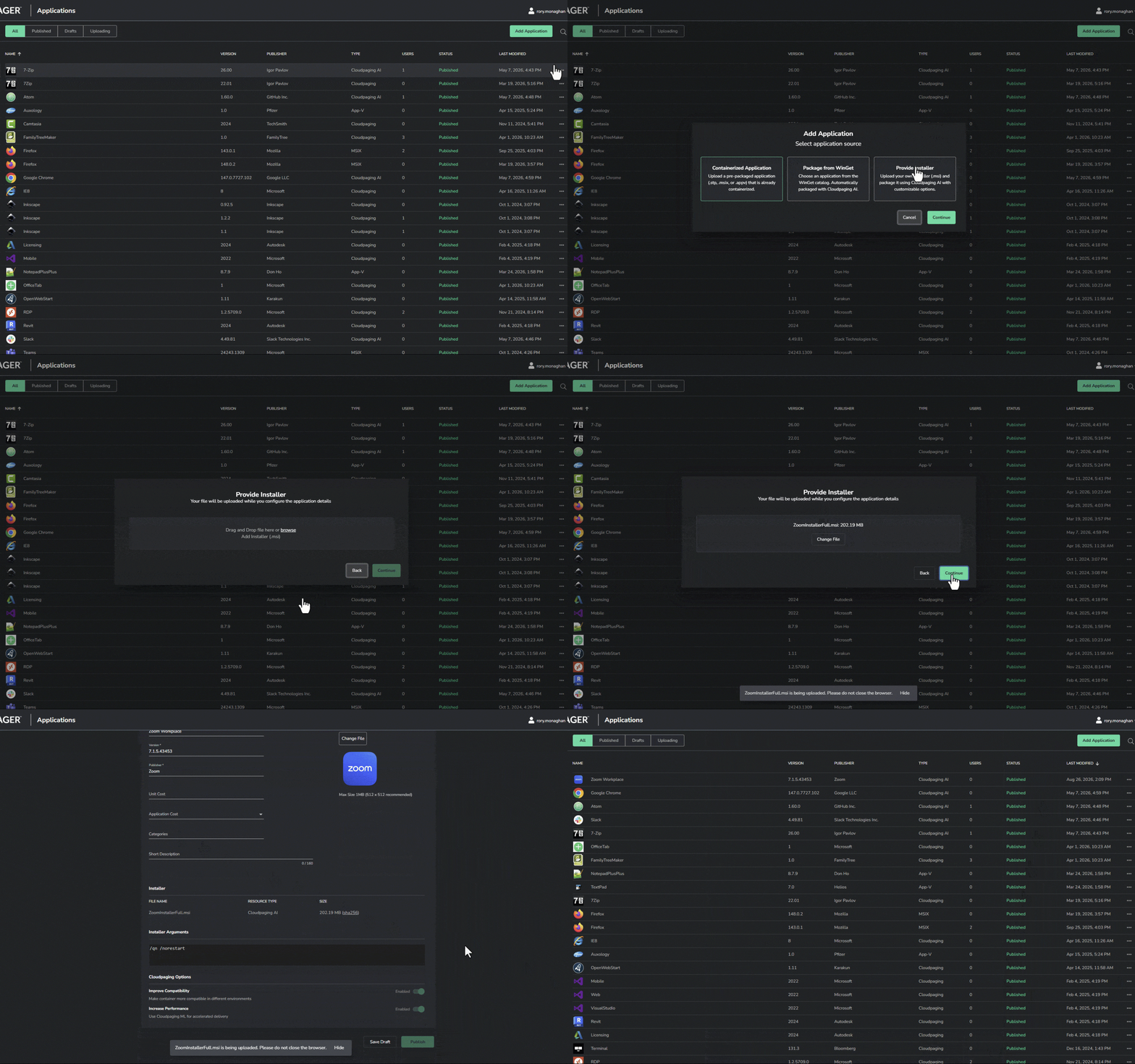
Cloudpager’s AI Packaging enables you to transform application packaging into a series of simple clicks. You can simply drag-and-drop application installer media to the Applications tab or select consumer-off-the-shelf (COTS) from WinGet via the Cloudpager UI. Cloudpaging AI will handle the packaging work from there.

Application Packaging
Non-Interactive Packager
Our Non-Interactive Packager (NIP) is a specialized automation tool designed to streamline the packaging of applications into Cloudpaging containers. It removes the need for manual, GUI-based capture steps in Cloudpaging Studio, allowing you to easily automate the containerization of software installers at scale.

Application Deployment
Cloudpager Workpods
Workpods enable you to automatically deploy applications and team configurations directly to end-user endpoints at scale. With Incremental Workpod Rollouts, you can publish appsets using a controlled ring rollout method, significantly reducing risk and ensuring seamless, automated deployments across your organization.

Application Orchestration
Cloudpager PowerShell Module
Virtually every action you can take within the Cloudpager administrative console can be fully automated with the Cloudpager PowerShell Module, making it easy to streamline application orchestration.

Software Asset Management
Cloudager Policies
Create Cloudpager policies to limit application access to certain trusted devices, enforce license agreements, revoke application access on a certain day or whatever is required. Then simply view Cloudpager reports to monitor application usage and see your success.
The Use Case
Streamlining Application Management Across Physical and Virtual Windows Desktops
Establishing a single pane of glass to manage applications across your physical and virtual Windows desktops not only simplifies day-to-day operations, it enables you to expedite migrations onto, off of, and between virtual desktop solutions and new Windows operating systems. Better yet, containerizing your applications with Cloudpaging ensures even the most complex legacy applications can lift and shift to any modern Windows endpoint without the need to be repackaged.

Featured Video
AI Packaging for MSI Applications
Transform the packaging process from hours of work to a simple drag and drop of your MSI installers to the Cloudpager management console. Upon upload, Cloudpaging AI containerizes your applications and makes them available to provision across all your physical and virtual Windows desktops in minutes.
WEBINAR · ON-DEMAND
AI Packaging for MSI Applications | Cloudpager Tutorial & Demo
Cloudpager’s AI Packaging now enables you to drag and drop any .MSI installer to the platform and automatically be containerized. No scripting. No repackaging complexity. No delays. In this video, Rory Monaghan shows how you can eliminate manual packaging work and accelerate application delivery with the latest advancement in AI Packaging within Cloudpager.
"We’re thrilled to see partners like Numecent move quickly to enable application compatibility across all Windows device architectures, from Windows on Arm to Windows 365 and Microsoft Azure Virtual Desktop. Their support for Windows on Arm helps accelerate enterprise adoption by removing barriers for legacy and modern applications alike, allowing organizations to fully embrace the next generation of Windows experiences."
KD
Klaus Diaconu
Partner Director of Product Management
Partner Testimonial
Microsoft
Enterprise Software · Global
- Unifies application management
- Enables legacy and modern apps to run on modern OS
- Unlocks ability to deploy across x86/64 and ARM64 endpoints
Go deeper
Additional Resources
Video
Cloudpager Platform Demonstration
Get a comprehensive walkthrough of the Cloudpager platform, from AI Packaging and dynamic provisioning to reporting, software policies, and third-party integrations.
Video
The Economics of AI Packaging
Reduce application packaging projects from weeks to minute with drag-and-drop packaging of MSI applications and WinGet applications.

See Cloudpager in Action
Explore how you can automate application management across your physical and virtual Windows desktop environments.