


At recent events, people have been asking me all about best practices for handling application settings and user data when you containerize your applications with Cloudpaging and orchestrate deployments with Cloudpager. Being that it continues to be brought up, I figured it is worthy of a blog post. Let’s dive into some of the options available to our customers.
Write to Local Profile with Sandbox Exclusions
There are various ways you can roam your user application related data when you containerize your applications with Cloudpaging. Thanks to the granular nature of the isolation used in our container, it is possible for your containers to write to the local profile/local disk, if you so wish.
Cloudpaging application containers can be configured to exclude certain folders and registry keys including profile and HKCU locations.

This may suit certain profile management solutions and may be viewed as a path of least resistance as it aligns with how customers handle roaming for application settings of existing applications. Organizations must be mindful and manage exclusions from the container sandbox in-line with their requirements to ensure the data is not written to the container sandbox.
Roam Sandbox with Cloudpaging UEM
Another option, particularly for those using non-persistent virtual desktops and solutions like FSLogix – is to use our UEM feature which can be configured on the client side. This places the entire sandbox including the registry in a location that can be roamed by your profile management solution.

This is a more encompassing approach than some of the alternatives as it not only roams the entirety of the application sandbox but can also help roam application state, improving performance on non-persistent desktops. This can work well for certain applications and use cases.
Default Applications Settings Delivered in Physical Disposition Layers
Our recommended approach can be two-fold. There is the possibility of leveraging our unique Layer 1 disposition layer (see Cloudpaging container diagram below), which writes to the local disk by design, so these can be roamed with your existing management tooling after delivery of the application.
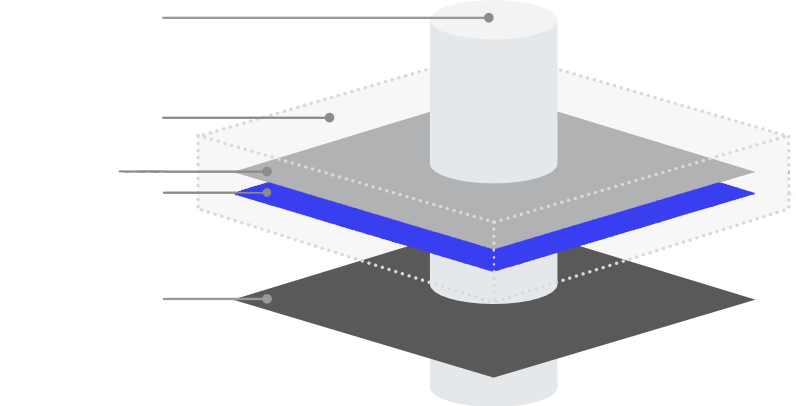
This enables you to effectively capture a default application setting or profile data for a user, deliver that and then have it modified on the local system and roamed with your existing profile management solutions. It is worth noting, if there is already a local version of a file before the application is delivered, that local file could be overwritten by a new one delivered with the application container.
I stated it can be two-fold because most modern applications create any user specific directories, files and registry upon launch if they do not already exist. So, you could leverage Layer 1 when you wish to deliver a default application setting/profile data with an application, and you could just use sandbox exclusions on your profile and HKCU directories when the application creates the profile settings on launch. This means you can roam the data with your roaming solution of choice, and the settings persist when applications are updated the same way they would as when applications were traditionally installed.
Conclusion
The granular controls available with Cloudpaging makes it easy to accommodate roaming of user data in ways that best suit your needs.
You can see this in our unique policies features. You can also see this in our client configurations for application cache storage and management and as you can see in this blog post, that same granular control exists for user and application settings roaming. This makes Cloudpaging application containers for any desktop be it a persistent, non-persistent, physical or virtual desktop.
To learn more about how customers use Cloudpager with non-persistent desktops sign up for our newsletter.


