


Log Collection is in now generally available!
We are excited to share Cloudpager’s new Log Collection feature, designed to greatly streamline troubleshooting and remediation efforts for administrators. This feature enables administrators to retrieve Cloudpager logs from end user desktops on set intervals or on-demand. Upon request, logs are made available at the next refresh interval through the Cloudpager web console for administrators to download and view.
This mitigates the need for administrators to remote into a user’s machine and grab relevant logs. By making the logs available centrally in Cloudpager, administrative support efforts are greatly reduced.
Setting Log Collection Intervals
The Log Collection feature can be used by selecting an interval of your choice for frequency of how often the logs should be collected from desktops. This option can be found in Cloudpager by navigating to Settings -> System.

The collected logs can then easily be downloaded via the Desktops dashboard (see below). If the historical data in these logs are not adequate, you can request logs to get a copy of the current up-to-date logs.
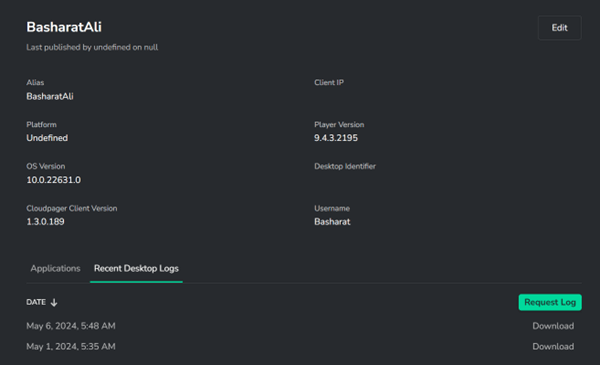
The logs contain all the information required by administrators to determine if there is an issue with the delivery of a Cloudpaging application containers or client failures that may be leading to degradation or failure.
How Log Collection Benefits Daily Desktop IT Operations
This feature will be loved by administrators, service desk employees, and end-users alike.
At times, a service desk may transfer a ticket to the End User Computing team. If the ticket is marked as a single device or user problem, it is unlikely to be categorized as a high priority ticket, meaning it may not be acted on immediately.
The employee facing the issue may continue to work around the problem while waiting for further support. Unfortunately, this often includes a lot of time wasted playing phone tag trying to set up a remote session with the user to troubleshoot and gather logs from the endpoint.
With our Log Collection feature, administrators can review the logs without any user interaction, saving time for administrators and limiting disruption to users.
Sign Up for Our Newsletter
Be among the first to learn about new Cloudpager® and Cloudpaging® product updates, new solution content, customer case studies, and more by signing up for our newsletter below:


