


Many of our customers love Cloudpaging Server, which has been seamlessly deploying applications at enterprise-scale for more than a decade. Some may not even be aware of our cloud-native content delivery network, Cloudpaging CDN (CCDN). Believe it or not, it has been in production for the better part of a decade. As the modern workforce continues to become increasingly distributed, the need for truly global IT operations has never been more prevalent. In the past year alone, we’ve seen a 500% increase in our cloud business.
There’s a simple reason for this. Traditional approaches to application management compound the cost and complexity of enterprise IT as the proliferation of hybrid and remote work continues. They need a truly modern approach to application management.
So, what are the biggest issues facing enterprise IT teams?
Applications!
Small apps, large apps, simple apps, complex apps, legacy apps, drivers, COM+…you get it. Modern desktop solutions are only as effective as the applications that run on them. If you can’t get your applications to run in a friction-free manner, you’re wasting time, money, and the patience of your workforce.
New Day, New Challenges
Elastic scaling and on-demand provisioning of IT resources – stemming from supply chain bottlenecks for new hardware – have proved invaluable over the past two years. Of course, hardware is not the only challenge to scaling up quickly to support your employees. New virtual desktops or even physical desktops doled out to employees means a bigger footprint, requiring more support hours from IT teams. Additional infrastructure may also be necessary, adding to your maintenance and patching efforts – likely resulting in the need to expand your IT teams. This is extremely difficult in the current market.
With workforces no longer working out of a single office building or corporate network, but rather their own home networks, IT operations and application management are experiencing a rapid paradigm shift. It’s no secret the tools IT has long relied on are no longer optimal for the new frontier of IT services.
There are countless horror stories from organizations relying on a VPN and traditional on-premises management tools in an attempt to scale application delivery and support over a less-than-traditional network for unexpected peaks in demand. We’ve heard it all, from higher application deployment failures and loss of access to backend databases or web services rendering apps useless for minutes at a time, to frequent RDP session disconnects and more exacerbating day-to-day operational issues for IT teams attempting to accommodate an unprecedented shift in workstyles.
It’s Time to Adapt
There was no time to optimize the remote working experiences three years ago. We all handled the situation the best we could with the tools at our disposal. That said, it is clear support for remote work is no longer a temporary emergency measure for enterprises, but a permanent. While the current economic outlook is grim, cloud services have continued to experience impressive growth.
On Microsoft’s earnings call in July 2022, they announced that Azure cloud services revenue increased by 40%. Azure Virtual Desktop monthly usage increased 60% year-over-year. Windows 365 has reportedly seen strong adoption. On a recent AWS earnings, call it was announced they hit a historic high run rate of $79 billion.
The fact of the matter is enterprises run on Windows. Most organizations are consuming Azure hosted services like Office 365, Microsoft multi-factor authentication (MFA), and Azure Active Directory (Azure AD), just to name a few key services. If the cloud can work for all these critical services, why not application management? For on-premises Numecent customers, what are the benefits of a lift and shift from Cloudpaging Server on-premises to Cloudpager, our cloud native software as a service (SaaS) platform?
How Does Numecent’s Cloud Offering Modernize Application Management?
Last year we launched Cloudpager: the first and only container management platform for Windows desktops. It brings modern, Kubernetes-like orchestration to your desktop applications. By virtualizing applications on a per-user basis, the challenge of delivering apps to 20k employees on 20k different home networks all over the country – or world for that matter – is no longer a challenge. The platform is designed to seamlessly provision and monitor any application across any Windows desktop, whether it is a physical desktop running in the office or at home, or a virtual desktop hosted in your data center or the cloud.

The foundation of Cloudpager is Cloudpaging CDN (CCDN), our global content delivery network and the cloud-native equivalent to Cloudpaging Server. It’s important to note this is not a new service. Cloudpaging CDN has been in production for nearly a decade. With rigorous penetration testing, Cloudpager’s cloud infrastructure is tried and true and sure to provide you with the best possible application delivery experience, regardless of where your employees are located. Better yet, with Cloudpager application delivery is no longer dependent on a VPN connection. We integrate with Azure Active Directory (Azure AD). If you still run services with a local domain, you can sync users and groups to Azure AD.

Heaven forbid, if your company gets hit by ransomware and needs to immediately shut down all systems, rest assured your apps can be accessed from cloud-hosted desktops and Azure AD will work even if on-prem Domain Controllers have been shut down.
If you never used a local domain but want to consume Azure services like Office 365 and Windows 365, Cloudpager will provide the best app delivery solution in this scenario too. The beauty of Cloudpager is you gain elasticity of scale as your user base grows and blended work styles continue to evolve.
If you have been using Cloudpaging Server or even Cloudpaging CDN, you’ve got to check out Cloudpager. If you have already packaged your applications with Cloudpaging, moving them into Cloudpager is easy. All it takes is a simple drag and drop to the Cloudpager admin console. Not only that, but the platform provides native support for App-V and MSIX containers too (read about App-V optimization capabilities here). Deploying all these containers couldn’t be easier. They can also be uploaded to Cloudpager with a simple drag and drop and assigned to any Azure AD group or user.
Within minutes you can optimize the provisioning and management of your entire application container estate. Cloudpager provides the power to seamlessly patch and update applications, with the added benefit of being able to quickly roll back any changes. This saves you and your employees hours of lost productivity, frustration, and risk.
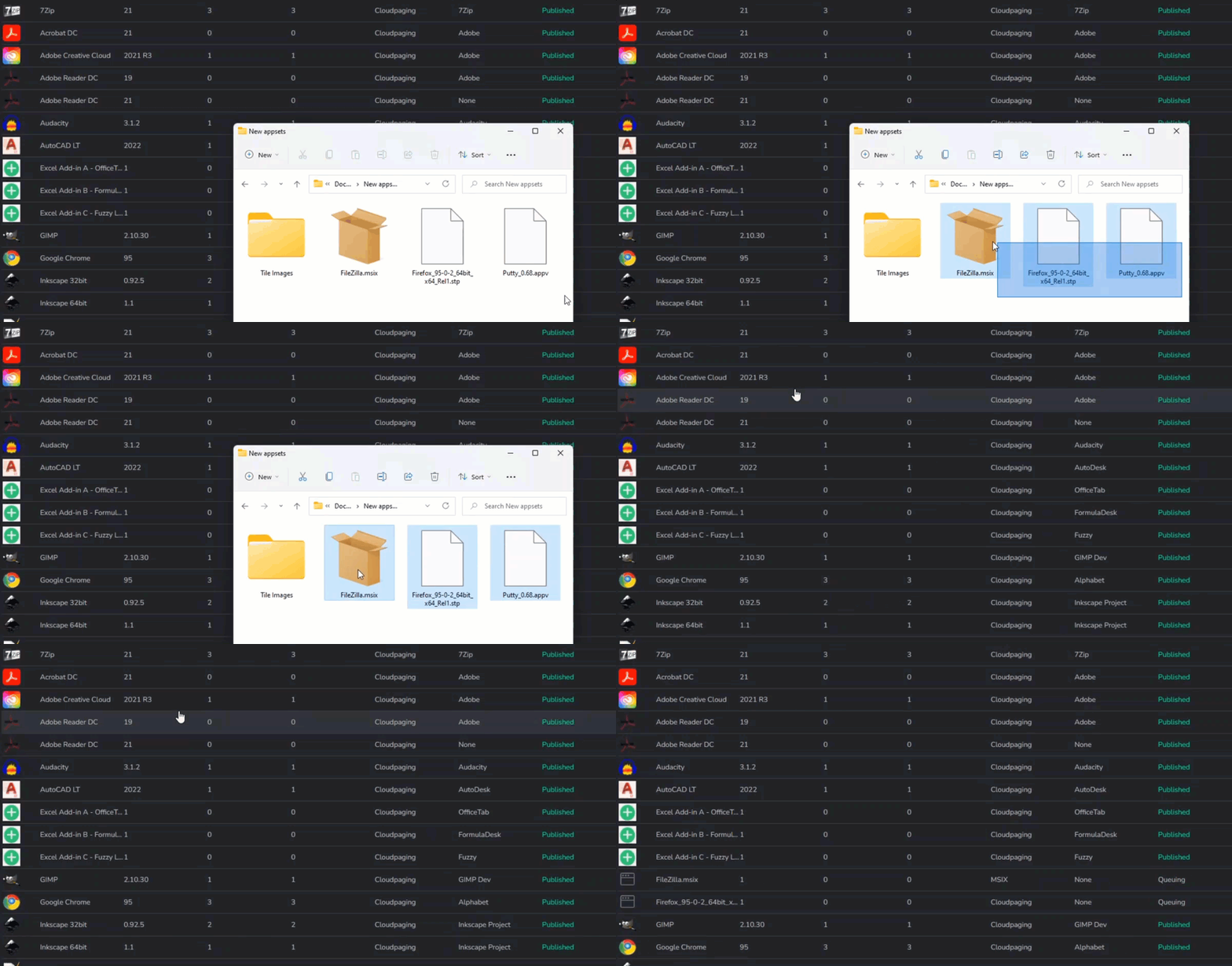
Cloudpaging Server admins will love the new enhanced workflow they get with Cloudpager. It is now simple to upload multiple apps at once. Moreover, uploads no longer prevent you from working. Admins can start the upload and continue with other taskswithin Cloudpager while the upload completes in the background. The Cloudpager UI provides real-time notifications to ensure admins are kept up to date as the upload completes.

Cloudpager Workpods can be used to logically group applications together and auto-deploy them to the assigned groups and users. Perhaps your finance department uses a specific set of applications. You can create a “Finance” Workpod with all the applications they need and assign it to your finance group. Now, any time your finance employees log in to a desktop with the Cloudpager Client – which authenticates with their Azure AD credentials – those applications will be dynamically delivered directly to their desktop.
As noted before, Cloudpager virtualizes applications on a per-user basis. This enables you to applications to be provisioned to active user sessions without requiring logouts or reboots for net-new deployments or application updates, eliminating downtime for scheduled and unexpected changes alike. Enterprises are already realizing significant reductions in time and effort spent updating applications by reducing the time spent on image management.

While you may want to auto-deploy most of your applications direct to your end user desktops, there are scenarios where you may want to make applications available on-demand from a web portal like you did with Cloudpaging Server and Enterprise Portal over the years. Cloudpager has you covered. You can now spin up multiple Storefront tailored to the needs of any employees in your organization. If users are a part of multiple Storefronts, Cloudpager will automatically consolidate all their apps into a single storefront catered to their unique needs. The Cloudpager Storefront also provides an optional user-driven rollback feature if you would like to give your users the ability to roll back application changes on-demand.

Our customers have long loved the ability to set restrictions on a per app-basis, such as limiting the number of concurrent users, setting an expiration date for application access, and more. Last year, we greatly improved the workflow in Cloudpaging Server for uploading and assigning applications. In Cloudpager, we enhanced it yet again with the drag and drop capability mentioned earlier. We also made policies an optional feature that can be set independent of the application assignment process.
Conclusion
The hybrid workforce is here to stay. Current application delivery solutions are too slow, unreliable, and don’t address many of the challenges of application provisioning at enterprise-scale. Cloudpager presents a truly modern approach to application management, enabling IT to seamlessly support hybrid workforces with the speed, scale, and agility of the cloud with the robust application controls enterprises have come to expect on-premises. Better yet, the flexible and highly collaborative nature of the platform means it seamlessly be incorporated to any IT strategy an enterprise is utilizing today and pivot with any changes tomorrow may bring.


