


Updates to Cloudpager improve platform performance more than 100X and expand multi-source capabilities for App-V, MSIX, and Cloudpaging
Our team has been hard at work expanding the performance and utility of Cloudpager. Today’s blog outlines the latest updates to Cloudpager, including enhancements to multi-source capabilities, the administrator console, and platform performance.
Multi-Source Support
Cloudpager has added multi-source features for all supported container formats – App-V, MSIX, and Cloudpaging – enabling users to specify registry values within the Cloudpager Client settings to identify local sources where their application packages reside[1]. If you have your own network drive or network store, Cloudpager can automatically check this location first to determine whether your respective application containers are there, which can drastically improve application launch speeds.
Administrative Console Updates
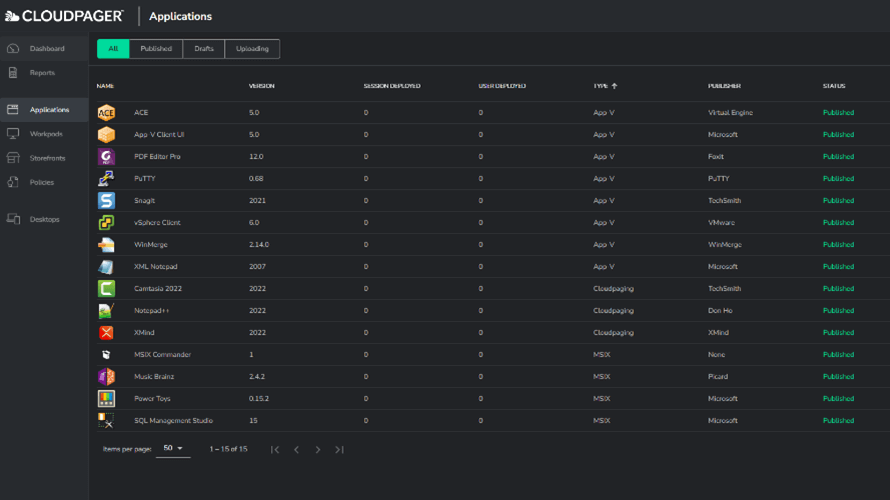
Changed the Default Tab to “Applications”
We’ve had a lot of requests from Cloudpager customers to switch the default home page from the “Dashboard” tab to the “Applications” tab. We heard you and made it so. Upon signing into the Cloudpager Administrator console the platform will default to “Applications”.
Improved Error Messages
Cloudpager now features more in-depth error messages across Applications, Workdpods, and Storefronts. Rather than simply display an error message, administrators will now get context around the error for common scenarios. Duplicate application GUIDs (unique identifier for an application) is a common example. If you happen to upload the same application twice, Cloudpager will provide an error message stating that an application with the same GUID already exists.

This will help administrators more easily mitigate issues, as well as provide Numecent support with easier paths to remediation.
Performance Improvements
To meet the scale of our enterprise customers, we have been working to improve load times. The latest version of Cloudpager boasts performance improvements of more than 100% for customers with large amounts of Workpods and Desktops, with some realizing performance gains of 1,000X.
Additional Resources
To stay up to date on all the latest information about Cloudpager, follow us on LinkedIn, Twitter, and YouTube. Existing customers can download the latest version of the Cloudpager client at download.numecent.com.
If you’re interested in learning more about how our technology portfolio can help simplify the mobilization and management of your Windows applications across modern desktop and multi-cloud environments, we’d love to connect.
[1] The latest version of the Cloudpager Client is required to enable multi-source capabilities for Cloudpaging containers.


