Dynamic Application Provisioning
Empower your workforce to securely work from anywhere with self-service application access via a beautifully curated web portal.

Keep Applications Out of Your Image
Traditional approaches to application packaging and deployments are inherently risky. For most organizations using VDI and DaaS, updates require IT to open their base images, utilize time-consuming workarounds to fix compatibility issues, and provision desktops to the new image version to rollout updated snapshots. This can result in a user logout or machine reboot. From the size of base images to the increasingly distributed nature of the modern workforce, the risk of downtime is compounded at scale.
What You Get
Rapid Application Deployment and Updates
Rapidly auto-provision applications and updates directly to employees outside of your desktop images, including all physical and virtual Windows endpoints running Windows 11, Windows Server 2025, and Windows on Arm.
No More Deployment or Update Failures
Cloudpaging containers eliminate MSI deployment and update errors, including application conflicts, unclean uninstalls, and more.
Improved Application Launch Times and Performance
Applications containerized with Cloudpaging only require about 10% of the appset to launch. Backed by machine-learning capabilities, you can accelerate launch times more than 20x.
Incremental Rollouts
New application deployments and application updates can be rolled out incrementally to provide further peace of mind before deploying to the masses.
Reduced Risk
Application containers are only available to entitled users and can be rapidly rolled back, making it easier to securely stay up to date with the ever-increasing frequency of application updates.
Overnight Windows Desktop Migrations
Cloudpager is Windows OS and desktop agnostic, meaning the same application containers can be provisioned to any physical or virtual Windows desktop. Moving across physical and virtual desktops is easier than ever, including future Windows desktop and server OS migrations.
Click. Containerize. Deploy.
Containerize your applications with AI Packaging, Numecent’s Non-Interactive Packager, or Cloudpaging Studio so they can seamlessly run on any modern Windows endpoint.
Containerize
AI Packaging can be used to package COTS applications available in WinGet or MSI installers you drag-and-drop to the platform. For all other applications, Cloudpaging Studio or our fully automated Non-Interactive packager have you covered. Once packaged, publish your application to Cloudpager.
Assign
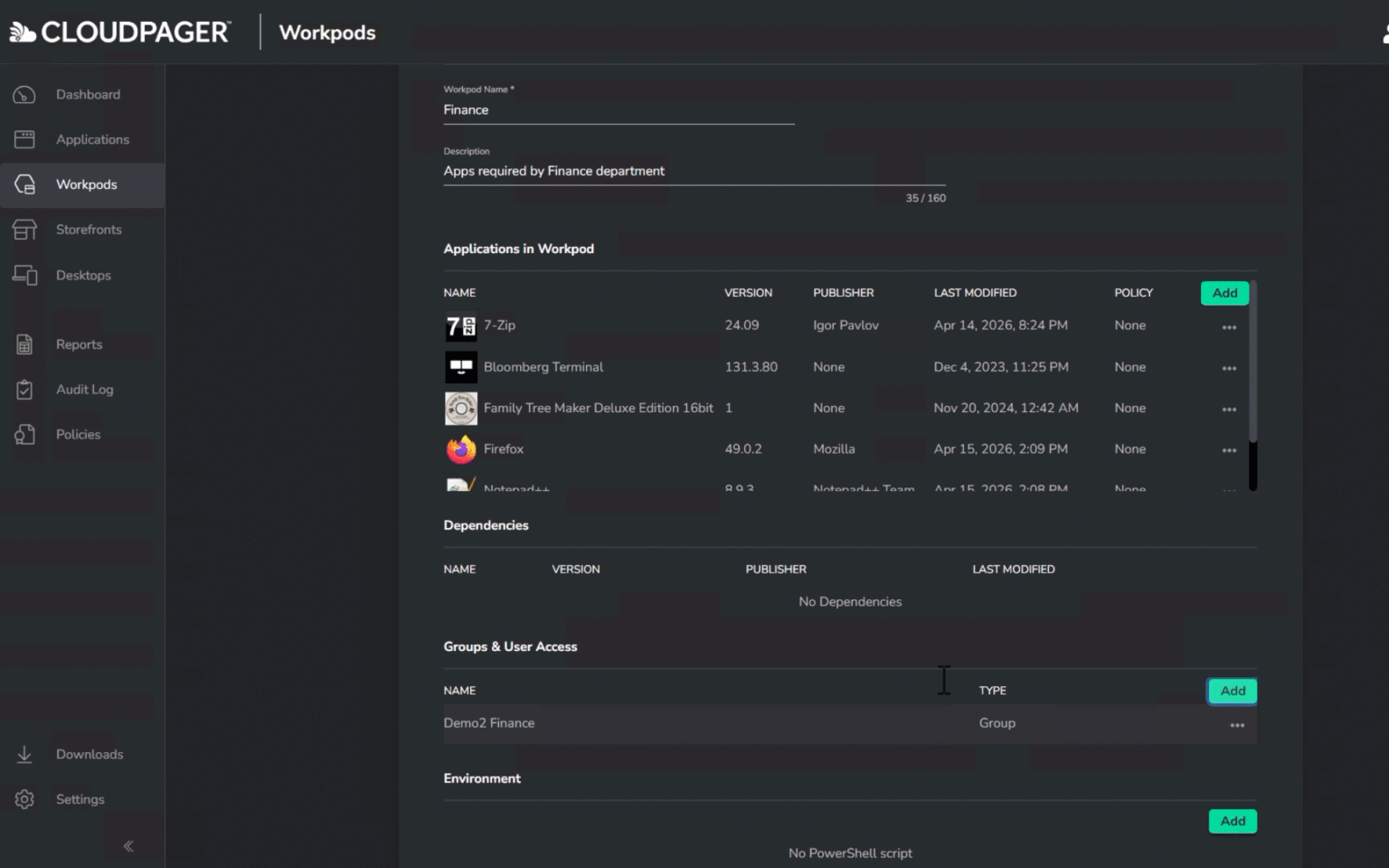
Auto-deploy applications directly to employee endpoints via Cloudpager Workpods, with the option to leverage incremental rollouts, or make them available within a web-based application storefront via Cloudpager Storefronts.
Deploy
Upon publishing, applications within Workpods will be dynamically provisioned to entitled employees. If there are any issues, they can be rolled back in real time. Apps assigned to Cloudpager Storefronts will immediately be made available on-demand.
Key Use Cases
Keep Applications Secure and Up to Date
Automatically package updates and deploy them across your environment with minimal intervention required.
Reduce Application Downtime
Minimize the time between a software release and user availability by automating packaging, validation and deployment workflows.
Reduce Need for Manual Packaging
Replace repetitive packaging and publishing tasks with automated workflows that keep applications current while reducing administrative effort.
Move on From Dated Package Formats
Installing antiquated package technologies leads to failed installs, erroneous updates, application conflicts, OS rot, unclean uninstalls. Application containers eliminate many of these challenges.
Accelerate Windows and Cloud Migrations
Make supporting or migrating across Windows OS versions or platforms such as AVD, Windows 365, Citrix DaaS and more – a much simpler task.
Improve Software Governance
Maintain visibility into application versions, deployment status, and update history while ensuring users receive approved software releases.
Whitepaper 5 Requirements for a Future-Proof Solution to App-V’s End of Life
It's Time to Plan for Life After App-V
App-V Full Infrastructure ’s end of life is April 14, 2026. While there have not been updates to App-V for years, enterprises have invested far too much time and resources into the solution to spend the next few years replacing it. Enterprises need a solution that preserves all their existing App-V packages without sacrificing functionality or performance across modern Windows desktop and multi-cloud environments.
This whitepaper highlights five requirements for a future-proof solution that enables you to run App-V beyond end of life without any manual work or repackaging.
Additional Resources
How to Use Incremental Workpod Rollouts
Explore Cloudpager’s Incremental Workpod Rollout feature so you can take a ring-based rollout approach to application deployments and updates.
How to Dynamically Provision Apps to Windows 365 Outside Your Desktop Images
See how a simple drag and drop of your MSI installers to Cloudpager enables you to containerize them within a few minutes.

See Cloudpager in Action